 Storechestra
Something big is coming
Every store you own.
One screen.
Stop juggling tabs and logins. Storechestra puts sales, orders, stock and customers from every Shopify store you run into one calm command centre. Built by a merchant running 16 stores of his own.
Founding member
25% off Storechestra when we launch. Waitlist members only.
Waitlist members hear first. No spam, unsubscribe any time.
- ✓ Secure Shopify connection
- ✓ Human-controlled write-back
- ✓ Built by a 16-store Shopify merchant
- 16Shopify stores run by the merchant who built it
- 1screen for sales, orders, stock and customers
- 0changes sent to your stores without a person confirming
 Join the waitlist
BUILT FOR MULTI-STORE SHOPIFY TEAMS
Every Shopify store.
Perfectly in sync.
Bring sales, orders, customers, products, documents and inventory from every Shopify store into one beautifully clear command centre.
✓ Secure Shopify connection✓ Standard Shopify accounts✓ Human-controlled write-back
app.storechestra.co.uk
Good morning
Sales across your group
ONE LOGINEVERY STOREONE CLEAR VIEWLESS ADMIN
STOP SWITCHING BETWEEN STORES
Seven dashboards.
Seven dashboards.
One command centre.
Storechestra brings each store’s live performance and operational work into one controlled view without removing the identity, permissions or data boundaries of the individual stores.
See the working dashboard →BEFORESeven separate Shopify admin windows
Too many tabs. No group view.
→STORECHESTRA
AFTEROne clear operational workspace
Storechestra · All stores
YOUR ENTIRE GROUP, TOGETHER
Seven dashboards become one.
Stop jumping between Shopify accounts. Storechestra gives your team the full picture without the daily tab-switching.
Combined sales intelligence
See group totals and compare stores across today, week, fortnight, month or any custom date range.
Explore sales intelligence →Orders and exceptions
Search orders across every store, isolate refunds and cancellations, and keep problem orders out of the dispatch queue.
Explore orders →Documents ready to print
Create branded invoices, delivery notes, packing slips and pro-formas individually or in controlled batches.
Explore documents →Inventory control
See stock by store and Shopify location, receive low-stock warnings and confirm adjustments before they are written back.
Explore inventory →Customers and risk
Understand customer activity, order history and operational risks across the stores your authorised team operates.
Explore customers →Operational alerts
Log connection failures, throttling and dashboard-impacting events in one daily alert history.
Picking and dispatch
Run shared picking queues, status controls, tracking and audit history without losing each store’s identity.
THE REAL WORKSPACESee Storechestra
See Storechestra
in action.
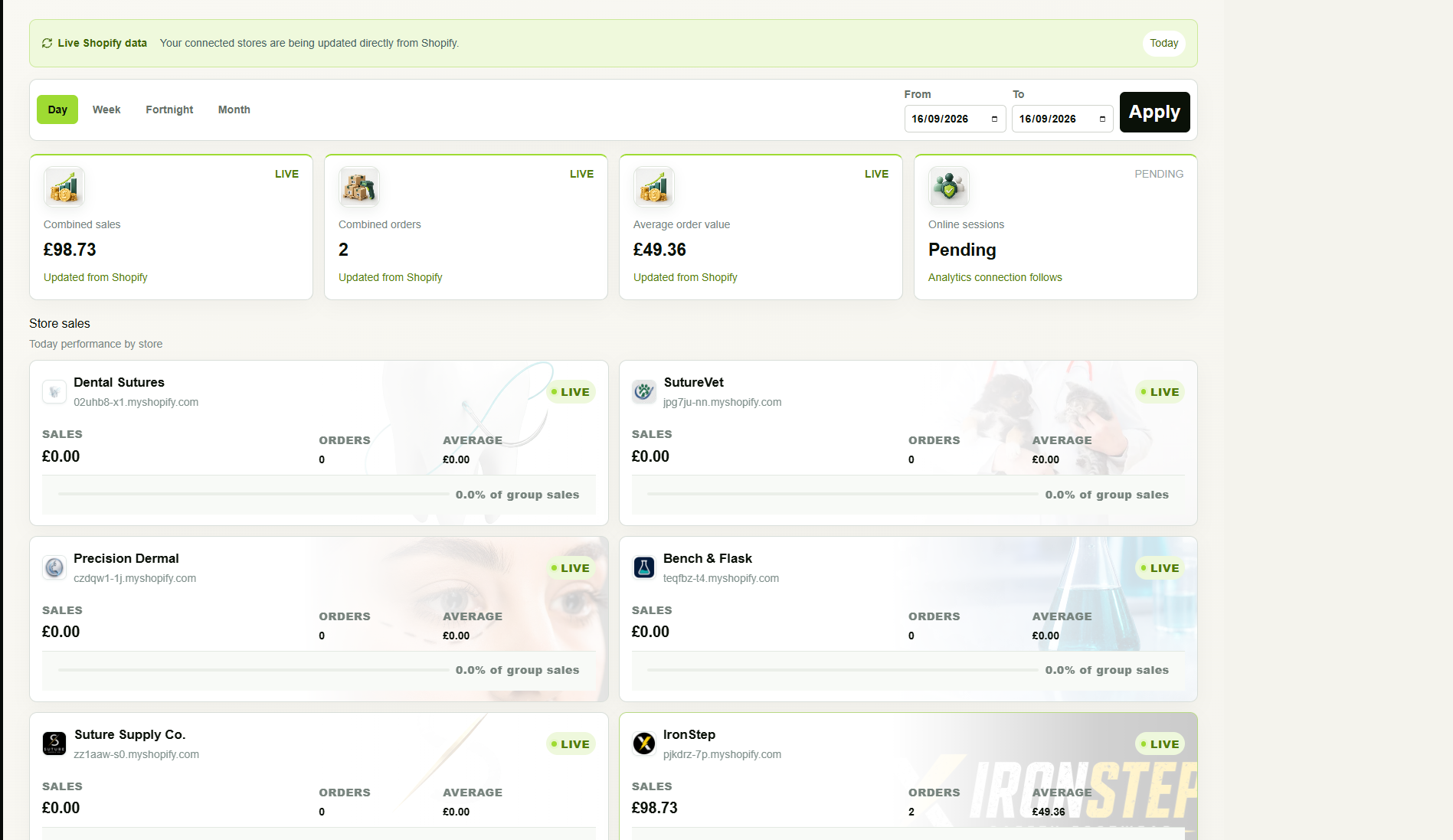
Real views from the working Storechestra build show how a multi-store group moves from high-level performance into operational control.
GROUP COMMAND CENTRE
Every store, visible at once
Follow combined sales, orders and store-by-store contribution across connected Shopify businesses from one live operational view.
- Day, week, fortnight, month and custom dates
- Store identity and connection state remain visible
- Move from group totals into an individual store
Storechestra · Overview
Storechestra · Owner control
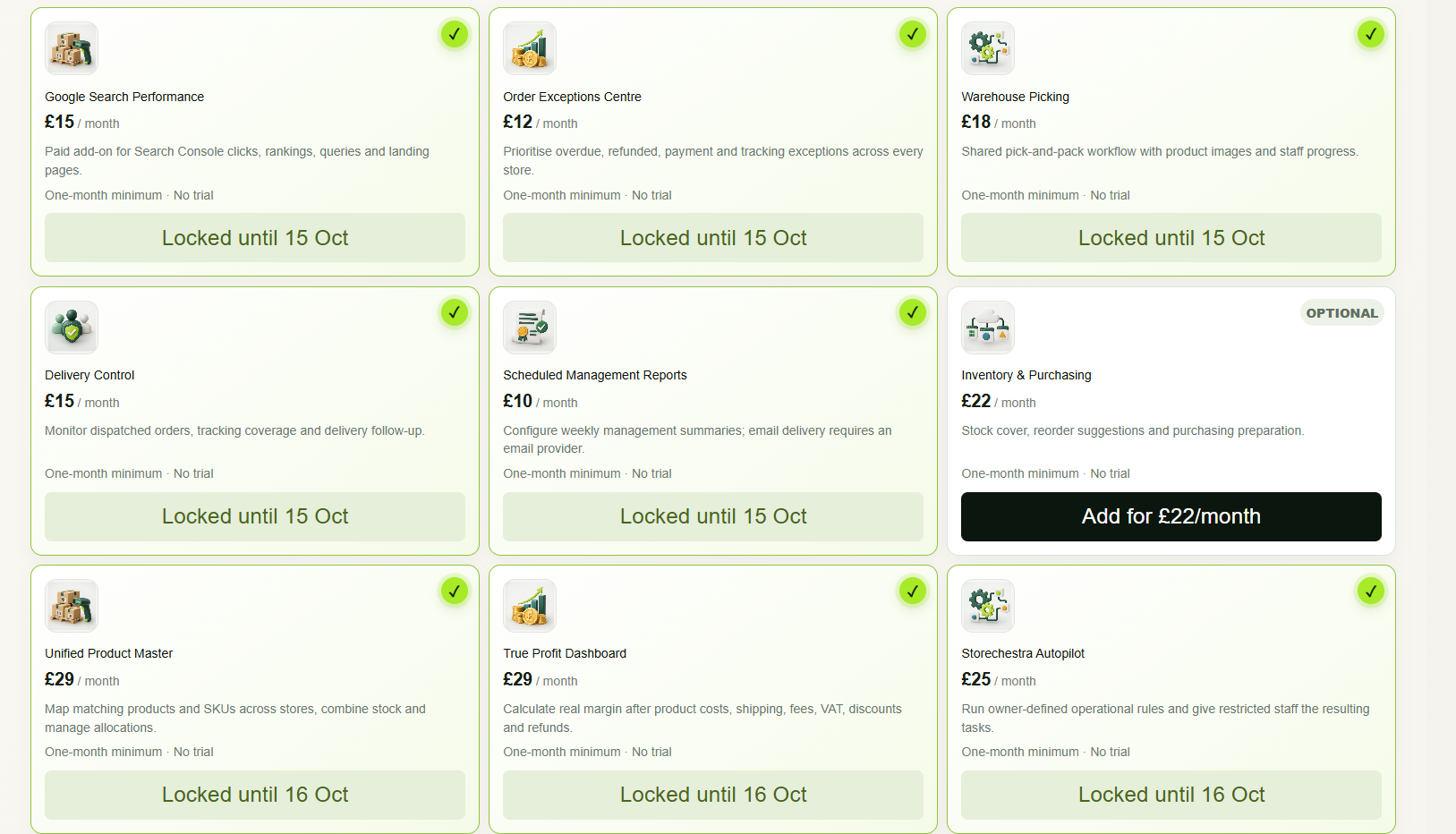
MODULAR OWNER CONTROL
Build around the way you operate
Owners can review optional capabilities and distinguish enabled modules from those available to add.
- Add only the modules you need
- Activation status visible to the owner
Screens shown are taken from an internal development workspace. Displayed store names, values and module states are illustrative of the interface and may change as the platform develops.
MULTI-STORE SHOPIFY MANAGEMENT
Manage multiple Shopify stores without managing multiple dashboards.
Storechestra is a centralised Shopify management platform for multi-brand businesses, ecommerce groups and operational teams that need one dependable view across separate stores.
One Shopify multi-store dashboard
Bring group sales, store performance and operational status together without repeatedly switching Shopify admin accounts.
Multi-store order management
Search authorised orders across connected Shopify stores and identify refunds, cancellations, payment issues and fulfilment exceptions.
Multi-store inventory visibility
Review stock by Shopify store and inventory location, monitor low quantities and use controlled adjustment workflows where enabled.
Consolidated Shopify reporting
Compare sales, order counts, average order value and store contribution across your ecommerce portfolio in one reporting view.
Unified products and SKUs
Understand which stores sell matching products, identify duplicate SKUs and prepare centralised product and allocation rules.
Multi-brand ecommerce operations
Coordinate staff, documents, inventory, alerts and fulfilment processes while each connected brand keeps its own store identity.
37 OPTIONAL BOLT-ONS · SIX CATEGORIESSpecialist tools.
Specialist tools.
Only when you need them.
Start with the multi-store control centre, then add the operational capabilities that suit your team. Release availability and integration requirements are confirmed before activation.
PRODUCT CONTROL
Unified Product Master
Match SKUs across stores, identify duplicates, review combined stock and control shared or separate inventory rules.
FINANCIAL CONTROL
True Profit & Margin Intelligence
Bring product costs, shipping, fees, discounts, refunds and tax context together for clearer margin reporting.
WORKFLOW CONTROL
Storechestra Autopilot
Create guarded rules for payment holds, refunds, fraud checks, unavailable stock and owner approval thresholds.
OWNER INTELLIGENCE
Daily Owner Brief & Alerts
A focused operational summary covering sales, margin, refunds, stock, late orders, connection health and exceptions.
WAREHOUSE
Scan-Verified Packing
Verify products against order lines and prevent a pack from progressing when a barcode does not match.
WAREHOUSE
Multiple Warehouses
Separate locations, allocate stock, manage transfers and prepare store-specific or shared workflows.
AFTERSALES
Returns & Chargebacks
Keep evidence, messages, timelines and response deadlines together across every connected store.
GOVERNANCE
Advanced Staff Permissions
Control staff access by store and action, with approval limits for sensitive operations.
INVENTORY
Bundles & Kitting
Define component quantities so kits and multi-item offers can be understood at component level.
FULFILMENT
Smart Order Routing
Prepare rules that route work using location, stock availability, fulfilment region and operational priority.
SHIPPING
UPS & Royal Mail Shipping
Connect supported carrier accounts for shipping workflows, subject to account approval, service configuration and testing.
PURCHASING
Purchase Orders
Turn approved replenishment recommendations into controlled supplier purchase-order workflows.
ACCOUNTING
Xero
Connect accounting workflows with your authorised Xero account. A separate Xero subscription may be required.
MARKETING
Advanced Email Marketing
Connect Brevo for advanced email marketing workflows. Provider charges and sending limits are separate.
SEARCH INTELLIGENCE
Google Search Performance
Bring authorised search performance reporting into your operational workspace.
PROCESSING
Power Lane
Additional processing capacity for growing operations, subject to platform limits.
PROCESSING
Power Lane Pro
Our enhanced processing option for larger workloads, subject to platform limits.
BUILT TO KEEP YOUR OPERATION MOVING
More tools. Clear release status.
Explore all 37 optional bolt-ons across six categories, plus the latest workspace tools and controlled trials.
See the complete bolt-on catalogue and prices →IN USE · PLATFORM OWNER TOOLS
Meet Bolt. A watchful pair of eyes.
Bolt brings Storechestra’s maintenance tools to life. The owner panel checks store connections, reviews recorded faults and background sync queues, and repairs eligible webhook configurations. AI diagnosis helps investigate recorded server failures and runs supported recovery checks.
Service reports show what was checked and when. Other bugs stay flagged for investigation; individual bolt-ons and third-party delivery require their own checks. Wider customer access has not been announced.
WORKSPACE CAPABILITIES
A clearer way to work across stores.
Reporting Studio
Run and save cross-store order reports.
Data Exchange
Export store data and validate product imports.
Store Copy & Sync
Compare catalogues before copying between stores.
Developer Connect
Create scoped, expiring read-only access.
PILOTS & COMING SOON
Try what’s next. Know what’s ready.
These tools are in controlled trials. Wider availability and release dates will be confirmed before general release.
Marketing Pilot
Explore the marketing workspace through a controlled pilot.
Blog Studio
Explore product-led blog drafting in the pilot workspace.
Discount Studio
A dedicated discount workspace currently in private trial.
Workspace permissions, plan eligibility and connection requirements apply. A catalogue listing is not a guarantee of activation. Contact us to confirm access for your operation.
Ask about tools and early access →MADE FOR GROWING GROUPS
More stores shouldn’t mean more chaos.
Whether you run one specialist brand or an international portfolio, Storechestra gives each organisation its own secure workspace and keeps every connected store neatly separated.
- Encrypted Shopify connections
- Separate workspace for every company
- Store limits matched to your package
- Designed for desktop and iPhone
Store OneToday
£4,892Store TwoToday
£2,641Store ThreeToday
£1,978Group totalAll stores
£9,511STORECHESTRA JOURNALPractical ideas for
Practical ideas for
multi-store teams.
Guides, product updates and operational thinking for businesses managing several Shopify stores from one group.
01ORDERS
OPERATIONS · 6 MIN READ
How to manage orders across multiple Shopify stores
Build one clear operational queue without losing the identity, status or controls of each individual store.
Read the guide →02STOCK
INVENTORY · 5 MIN READ
When stock should be shared—and when it should stay separate
A practical look at pooled inventory, Shopify locations and safer human-controlled stock adjustments.
Read the guide →03RELEASES
PRODUCT UPDATE · 4 MIN READ
What we are building into Storechestra
Follow the latest work across orders, documents, inventory, owner controls and multi-store reporting.
View product updates →DETAILED QUESTIONS & ANSWERSKnow exactly how
Know exactly how
Storechestra works.
Clear answers about connecting stores, daily operations, permissions, data, modules and subscriptions before you commit.
01
GETTING STARTED
Stores and setup
What is Storechestra?
Storechestra is a multi-store operational workspace for organisations that run one or more Shopify stores. It brings authorised sales, orders, products, customers, inventory information, documents and operational workflows into one central dashboard while keeping the underlying stores separate.
Do I need Shopify Plus?
No. Storechestra is designed for standard Shopify accounts as well as eligible Shopify Plus stores. The exact information and actions available depend on the Shopify API capabilities, plan restrictions and permissions approved by each connected store.
Do all my stores need to use the same Shopify account or email address?
No. Each store can have its own Shopify ownership and staff structure. An authorised person connects each store individually, after which Storechestra associates it with the correct organisation workspace and subscribed store allowance.
How is each store connected?
Each store completes its own secure Shopify authorisation process and approves the permissions required for the enabled features. Storechestra does not ask merchants to share their Shopify password. A store may need to reconnect if permissions change or Shopify requires renewed authorisation.
How long does onboarding take?
Connection itself can be quick, but total onboarding depends on the number of stores, catalogue and order volumes, permissions, selected bolt-ons and any data preparation required. We confirm the expected process before rollout and may stage larger portfolios rather than enabling every workflow at once.
02
DAILY OPERATIONS
Data and workflows
What information can I see in the central dashboard?
Depending on the plan and enabled modules, the workspace can show group and store-level sales, order activity, product and SKU information, inventory by Shopify location, customer activity, documents, exceptions, connection health and operational alerts. Users see only the areas and stores permitted by their role.
Does Storechestra replace Shopify?
No. Shopify remains the system operating each online store. Storechestra provides a consolidated operational layer above the connected stores, reducing account switching and bringing selected cross-store work into one controlled workspace.
How current is the information shown?
Storechestra uses supported Shopify APIs, webhooks and background synchronisation. Update timing can vary with the event, store configuration, Shopify availability, API throttling and queue workload. Connection and processing issues are surfaced through status and alert features rather than being presented as guaranteed instantaneous synchronisation.
Can Storechestra update Shopify data?
Only enabled features with the required Shopify permissions can write data back. Sensitive actions can use confirmation steps, current-value checks and audit records. The merchant controls which staff may perform those actions and remains responsible for reviewing configuration and operational decisions.
How does inventory control work?
Core inventory visibility can show available quantities by connected store and Shopify location. Authorised adjustment workflows can write confirmed quantities back where the store has granted the necessary inventory permission. Shared-stock, allocation, bundle and multi-warehouse behaviour is configured separately and should be tested against the merchant’s real fulfilment process before activation.
What happens if Shopify throttles a request or a store stops responding?
Temporary API limits and connection failures can occur. Storechestra records dashboard-impacting alerts, identifies the affected store and can retry eligible background work. A throttled or unavailable connection should not be represented as healthy until a successful check is received.
03
PEOPLE & CONTROL
Users and security
Can warehouse and office staff have different access?
Yes. Role-based access is designed to separate owner, management, accounts, customer service, picking and packing responsibilities. Access can be restricted by workspace area, store and permitted action, subject to the role controls included in the chosen package or bolt-on.
Can I see who changed something?
Supported actions can be recorded in Storechestra’s audit history with the user, action, store, time and outcome. Audit records help owners investigate operational changes, but they do not replace Shopify’s own records, appropriate supervision or external compliance controls.
How is merchant data separated?
Storechestra is being structured as a multi-tenant service in which organisations, users, connected stores and operational records are associated with the correct workspace. Access checks are applied on the server as well as in the interface. Public rollout remains subject to production security, privacy and tenant-isolation testing.
Should we enter passwords or API secrets into support messages?
No. Never send Shopify passwords, carrier secrets, private API credentials or customer payment-card details through the contact form or ordinary support messages. Approved connection and secret-entry screens should be used when credentials are genuinely required.
04
SUPPORT & SUBSCRIPTION
Help and cancellation
What support is available?
Support arrangements depend on the subscribed package and rollout stage. Enquiries can be submitted through the contact page, with priority and onboarding support available where stated in the applicable plan or written agreement.
How do I cancel?
Cancellation can be requested through the available billing controls or by contacting Storechestra. It normally takes effect at the end of the paid billing period, subject to the Billing & Cancellation policy and the billing platform used. Charges already incurred are not automatically reversed by uninstalling a connected app.
What happens to our data if we leave?
Access is restricted when service ends and connected credentials are disabled as appropriate. Merchant data is then deleted, returned or anonymised in accordance with the agreement, applicable retention process and legal obligations. Specific data-export needs should be raised before termination.
Can we discuss our operation before choosing a plan?
Yes. Use the contact page to tell us how many stores, users and locations you operate and which workflows create the most friction. We can then discuss the most appropriate base package, relevant bolt-ons and any technical prerequisites without presenting planned features as already active.
READY TO CONDUCT YOUR STORES?
Bring every store under control.
Tell us how many stores you operate and which workflows create the most friction.
Join the waitlist →